
Flex your NFT, right in Discord.
For projects on the GraveMarket.io marketplace, admins can configure a!flexcommand so users can show off any NFT from your collection in chat, with rarity, tier, and the image baked in.
What it looks like
A member types !flex 118, and The Reaper responds with the artwork, rarity rank, tier, and a link back to GraveMarket.io. Works with the NFT number or its on-chain name.
!flex 118By token number!flex BonebreakerBy name (must match exactly)!flex hell-houndz 42Cross-collection (if enabled)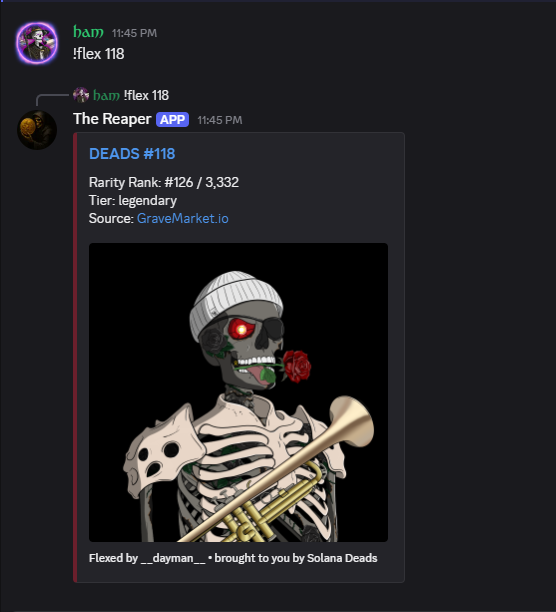
Set it up in your server
- 1
Make sure The Reaper is in your server
An admin invites the bot. If you do not have it yet, add it from the dashboard.
- 2
Find your collection slug on GraveMarket.io
Open your collection page on gravemarket.io. The slug is the last part of the URL, for example gravemarket.io/collection/hell-houndz means the slug is
hell-houndz. - 3
Run /flex-config in Discord
An Administrator runs /flex-config collection slug:<your-slug>. The Reaper verifies the collection exists, then locks !flex to that collection for your server.
- 4
Tell your community
Anyone can now run !flex <id-or-name> in any channel the bot can see.
- 5
Optional, change or clear the collection
Run /flex-config show to view current settings, /flex-config collection slug:<new> to switch, or /flex-config untrack to disable.
Command reference
!flex <id-or-name>AnyoneFlex an NFT from the server's configured collection./flex-config showAdminShow the current flex configuration./flex-config untrackAdminDisable !flex by clearing the configured collection.Ready to give your community their own flex command?
Open the Dashboard